
How Microsoft 365 Can Help Your Business Right Away

If you are a Microsoft 365 Business user, you might be wondering how you can use the various tools and services that are available to you to improve your productivity and performance. In this blog post, we will explain how using Microsoft 365 OneDrive, SharePoint, Viva Landing, and Teams can help you reuse and recycle […]
Why does Microsoft take so long to release new features?

Hi there! Welcome to another blog post from Netlogic, your trusted partner for Microsoft 365 solutions. Today, we want to talk about a common question that we get from our clients: why do some Microsoft 365 features take so long to become available for production use? New Feature Process 1. The Announcement You may have […]
What’s new from Microsoft Build 2023?

Welcome! Today, we are excited to delve into what went on at Microsoft Build 2023, the highly anticipated annual event for developers. At Microsoft Build, the gates to innovation swings wide open, offering a treasure trove of knowledge and inspiration to fuel your passion for app and experience creation. From the enchanting realms of AI, […]
Azure AD supports IPv6: What IT Managers need to know.

IPv6, the most recent iteration of the Internet Protocol (IP), serves as a cutting-edge solution that facilitates the identification and location system for devices within networks while effectively routing traffic across the vast expanse of the internet. Unlike its predecessor, IPv4, which has seen its addresses deplete rapidly due to the surging number of internet-connected […]
4 Key Points for Every Microsoft 365 Administrator

As a Microsoft 365 administrator, you have a lot of responsibilities and tasks to manage. You need to keep up with the latest updates, security features, and best practices to ensure your organization’s productivity and security. In this blog post, We will share with you four key points that you need to know as a […]
Microsoft 365 Web Apps Down Today April 20th, 2023

Unfortunately, Microsoft 365 web apps are experiencing a widespread outage today. This has caused frustration and inconvenience for many individuals and businesses who rely on these tools for daily operations. The outage began early this morning and has affected users around the world. The web apps affected include Microsoft Teams, Outlook, OneDrive, and SharePoint, among […]
Send NEW Excel Data to an Existing SharePoint List
How to send new Excel Data to an Existing SharePoint List If you frequently work with Excel data and need to share it with others, adding it to a SharePoint list can be a convenient and efficient solution. With SharePoint, you can easily collaborate with others and access the data from anywhere. In this tutorial, […]
Looking for a Top IT MSP Company? Look no further!

What does an IT Service Company do? Ever wondered what an outsourced IT Company can provide for your business or non-profit? Nowadays IT support goes much further than just fixing your desktop computers. Think cloud file storage, cybersecurity, remote access for workers, threat remediation and virtual CIO/CTOs. Beyond this think of compliance, backup and retention, […]
Microsoft Loop: Solutions for Small to Medium Enterprises
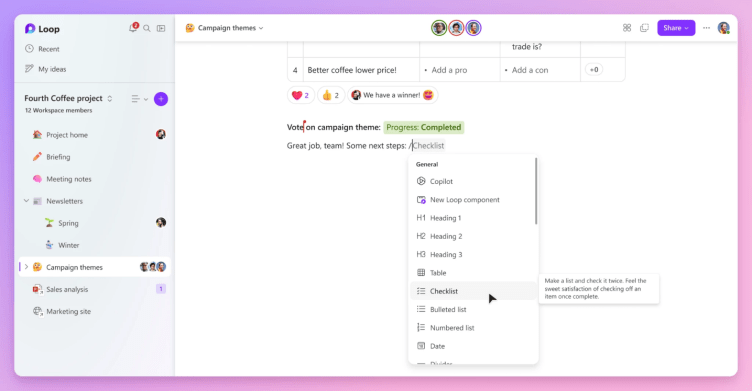
If you are a small to medium sized business owner, you might be wondering how Microsoft Loop can help you and your team work better together. Microsoft Loop is a new app that combines a powerful and flexible canvas with portable components that stay in sync and move freely across Microsoft 365 apps. With Microsoft […]
Open SharePoint Files in Desktop Applications by Default

There are several reasons why a user might want to open SharePoint files in the client application by default, instead of opening them in the browser. Here are a few possible reasons: More features and functionality: When a user opens a SharePoint file in the client application (such as Microsoft Word or Excel), they have […]

